How do I test Evalandgo's PRO and PRO+ features for free?
You can try our PRO and PRO+ options free for 14 days from the moment you publish a questionnaire that uses them.
During the trial, you can collect up to 25 responses and get hands-on experience with powerful customization, analysis, and distribution tools.
1. Create a questionnaire with PRO or PRO+ features
In the Creation module, build your questionnaire as you like
Add any advanced features you wish: scoring, multi-scoring, custom end page, webhook, dynamic report, URL prefill, email delivery, and more.

You can also view the list of PRO/PRO+ features used in each questionnaire from your dashboard in My Questionnaires — look for the icon or label indicating advanced features.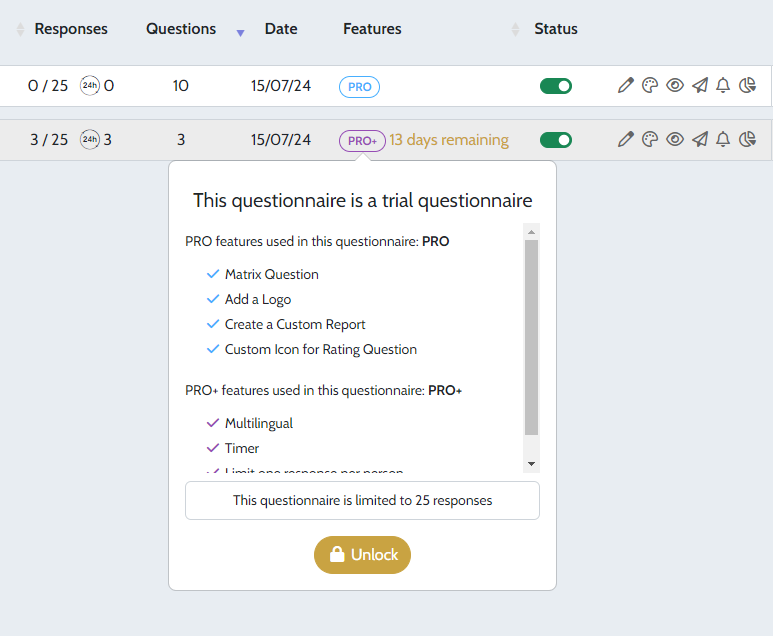
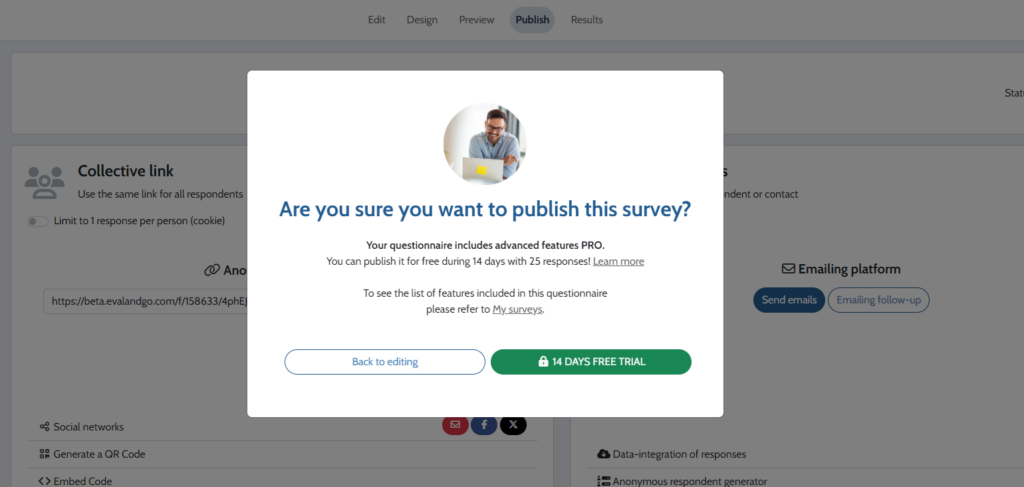
2. Publish to start your trial
- Start your 14-day trial (collect up to 25 responses), or
- Go back to Creation to remove the PRO/PRO+ features and remain on the Free plan.
3. What happens when the trial ends ?
- Your questionnaire will be locked if you haven’t subscribed to the appropriate paid plan.
- Respondents can still access and complete it, but you will no longer be able to view the results.
- PRO/PRO+ elements on your end page will be hidden.
- If you used a PRO+ feature but subscribed only to PRO, the questionnaire will remain locked
4. What if I don't want to test PRO or PRO+ features?
If your questionnaire contains only Free features, the distribution module will confirm this.
Once published, it will remain limited to these options. PRO and PRO+ functions will be locked for that questionnaire, but you can still test them by creating another questionnaire with advanced features.
Good to know
- The trial is per questionnaire, not per account.
- You can test multiple PRO/PRO+ features by creating several trial questionnaires.
- Need more time or personalized support?
Contact our sales team at 04 67 17 96 77 or book an appointment
Need some help?
Our support team is at your disposal via the chat integrated into the platform.
Related Articles
How does the Evalandgo trial account work?
Free Trial Account - 14 days to discover Evalandgo (100% free, no credit card required) When you sign up for Evalandgo, a trial account is automatically created. This account is 100% free, requires no credit card, and allows you to test all advanced ...Why is my questionnaire locked?
A crown has appeared on your questionnaire and you can no longer edit it? This crown means your questionnaire uses features reserved for a higher plan. Here is why, and how to get access again. The most common reason: a feature reserved for a higher ...Why do I only see 25 answers?
Are you checking your results and the counter seems stuck at 25 responses, even though you expected more? No need to worry: this is a limit tied to the free plan, and above all, none of your responses are lost. Here is the explanation. The ...How do I duplicate a questionnaire about Evalandgo?
How do I duplicate a questionnaire in Evalandgo? Duplicating a questionnaire lets you start from a ready-made template instead of building everything again. It is perfect for launching a new campaign based on a questionnaire that already works well, ...Create an online questionnaire with Evalandgo
Do you want to build a questionnaire, a quiz or a survey? Evalandgo lets you create your online questionnaire exactly the way you want, with no technical skills required. Thanks to an intuitive interface, you add your questions, customize the design, ...